
Building a Single Source of Truth Without
Rip-and-Replace
- Published on: January 30, 2026
- Updated on: January 30, 2026
- Reading Time: 6 mins
-
Views
Data in Silos Creates Reporting Chaos
What an SSOT Really Delivers
The Proven Reference Pattern
How to Build Without Replacing Systems
1. Decide on Canonical IDs
2. Align Calendars and Terms
3. Map Codes Live
4. Switch to Nightly Deltas
5. Validate on Ingest
6. Publish Plain Tables
7. Control Access
Pitfalls to Avoid
Cross-Listing After Census
“Full File Friday”
Unmapped Codes
Shadow Exports
Metrics That Prove This Works
The Smarter Path to One Trusted View of Data
FAQs
As a district IT leader or data leader, you might be hearing this quite often:
- The student IDs across SIS and LMS are mismatched
- There are duplicate staff records from HR
- State files are getting rejected, but nobody knows the reason why
Not to mention, reporting cycles have become tighter, and with that, the need for cleaner sheets, nightly validation, and shared IDs.
There is data, a lot of it. But that was never the problem. What is lacking is one trusted source of truth. This guide shows you how districts are building a Single Source of Truth (SSOT) using a governed lakehouse. It pulls nightly updates from tools like Canvas, PowerSchool, assessments, and finance systems, and aligns calendars, IDs, and codes with Ed-Fi and OneRoster. It provides role-based, plain-English views for users across roles. No rip and replace needed.
The Problem: Data in Silos Creates Reporting Chaos
Districts find themselves drowning in data. Rosters are handled by the SIS, engagement by the LMS, scores by assessment systems, and staffing by HR. All of this happens in silos, simultaneously.
When these systems are stitched together after the fact, the result is predictable: mismatched calendars, incorrect student IDs, and state codes being rejected due to inaccuracies. Manual merges waste weeks of time and pulls staff away from supporting teaching and learning.
What an SSOT Really Delivers
An SSOT acts as a governed data layer, often a lakehouse (for example, Snowflake or Databricks). It takes in nightly deltas from all sources, applies standards (Ed-Fi for student-centric interoperability and OneRoster for rostering), standardizes IDs/calendars/codes, and serves role-based views.
The result is simple and measurable in daily operations:
- Dashboards surface student status in plain language for end users
- IT gets audit logs and clearer traceability
- Leadership sees trusted MTSS trends and state files that pass on the first try
In short, it standardizes information from multiple sources, validates it, and publishes it in plain language with role-based access.
The Proven Reference Pattern
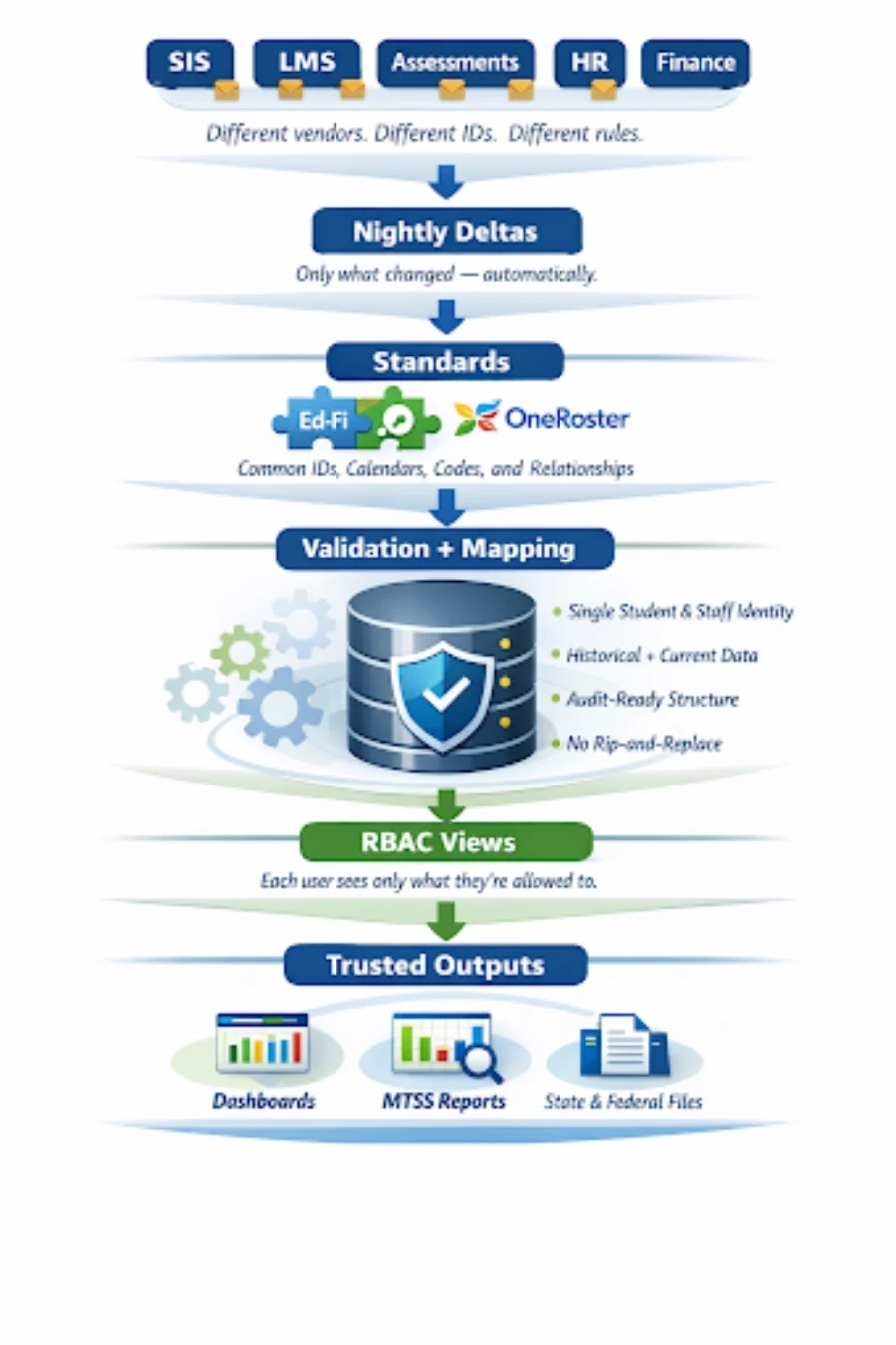
Standards act as the translation layer, so vendor changes do not break downstream reporting.
How to Build Without Replacing Systems: A Step-by-Step Guide
Rip-and-replace is not the solution. Focus on cleaner feeds from your tools.
1. Decide on Canonical IDs
Pick one staff, student, or course ID as canonical. Build crosswalks that map historical IDs back to the canonical ID so data remains consistent even as systems change.
2. Align Calendars and Terms
Most data issues come from mismatched time definitions across systems, not missing data. To reduce state reporting rejections, normalize start and end dates. This means having instructional days and learner attendance standardized across every system.
3. Map Codes Live
Districts maintain local values for fields like special education status, ethnicity, or course types. States often require specific enumerations. Maintain a central code-mapping table that continuously translates district values into state-approved values.
4. Switch to Nightly Deltas
Full CSV uploads create system overload. Delta-based nightly pipelines process only new or modified data, making issues easier to isolate and processing more stable.
5. Validate on Ingest
Validate before data lands in the lakehouse. Check IDs, calendar dates, enrollments, and codes up front, not after reports start disagreeing. Reject or quarantine bad data early to prevent contamination downstream.
6. Publish Plain Tables
Once standardized and validated, publish data in everyday language, not raw vendor schemas. Build tables that show students, enrollments, attendance, and grades that are readable and clearly stated.
7. Control Access
Teachers, district leaders, and analysts need different access to the same data, and this brings in the need for role-based access. Sensitive information should be protected with field-level permissions.
Pitfalls to Avoid
Cross-Listing After Census
It can break even a stable data model. Consider moving cross-listing updates to the next reporting window.
“Full File Friday”
Reprocessing every record through frequent full uploads can increase risk, not stability. Incremental nightly updates isolate problems to small data changes.
Unmapped Codes
They are one of the most common reasons for state submission failures. Local systems use their own values, which don’t match state-approved enumerations,and hence get rejected. A central code-mapping later flags new values without letting them slip unnoticed.
Shadow Exports
When teams export their own spreadsheets, they slowly become unofficial shadow files recorded without governance. This creates audit and privacy risks, especially with sensitive data. Strong role-based access and well-documented tables help solve this problem.
Metrics That Prove This Works
- Dashboards refresh on schedule and do not require manual reruns
- Validation passes on most nights, with clear explanations when it does not
- State files are accepted on the first submission
- Manual/legacy scripts are retired, and time is reclaimed
The Smarter Path to One Trusted View of Data
Replacing tools won’t get you an SSOT. That happens when your IDs are shared, calendars are aligned, codes are governed, and data is validated nightly.
Your existing systems can perform their roles and still produce consistent results when there is an SSOT. The most high-performing districts are not ripping or replacing. They are putting the right guardrails in place so that their data can work as one.

Harish is a future-focused product and technology leader with 25+ years of experience building intelligent systems that align innovation with business strategy. He drives large-scale transformation with cloud, data, and AI, leading agentic AI frameworks, scalable SaaS platforms, and outcome-driven product portfolios across global markets.
FAQs
Start with canonical IDs and calendar alignment because they unblock joins across SIS, LMS, and assessments. Then add ingest validation to stop errors early. A “small but reliable” SSOT beats a broad one that users do not trust.
Choose based on what you need the SSOT to serve: reporting and analytics (warehouse/lakehouse) versus real-time operational workflows (operational store). Many districts prioritize governed analytics (nightly deltas, validated tables), then extend into operational use cases once trust is established.
People in enrollment, attendance, grades, and HR domains should be explicit owners and treat mappings as living assets, not a one-time setup. Approval rights for changes, an exception process, and a simple way for users to report mismatches come under the ownership.
Make the governed tables and definitions easy to find, easy to understand, and consistent across roles. Pair that with access patterns that meet real user needs (for example, filtered views for schools) so people do not create “workarounds” just to do their jobs.
The safest option to accelerate implementation is to keep governance decisions in-house (IDs, definitions, access rules), consider external support for execution-heavy work like building pipelines, implementing validation gates, and documenting data products.

Get In Touch
Reach out to our team with your question and our representatives will get back to you within 24 working hours.