
Immersive Learning Solutions for K-12: Design, Outcomes, and ROI
- Published on: September 28, 2026
- Updated on: October 15, 2026
- Reading Time: 8 mins
-
Views
Improving Learner Engagement and Outcomes
Reviewing Immersive Learning Outcomes and ROI in EdTech Products
Choosing Immersive Learning Technology for EdTech Products
Designing Immersive Learning Experiences for Different Learners
Immersive Learning Use Cases for K-12 EdTech Products
Using Simulations and Virtual Labs for Hands-On Learning
Build Accessible AR, VR, and Immersive Learning Experiences
Align Immersive Learning with Educational Standards and Learning Objectives
Validate Immersive Learning Before Scaling
Magic EdTech’s Approach to Immersive Learning Solutions
The Real Product Decision
FAQs
Many demos showcase student enthusiasm for immersive learning. For K-12 publishers and edtech companies, the challenge is deciding whether that experience solves a real learning need and deserves a place in the product.
Start by identifying where students struggle with the current learning method. Then decide whether immersive technology can improve that aspect of the learning experience. For example, a virtual lab can let students change variables, see results, make mistakes, and try again in a safe environment.
The technology should add a clear educational benefit. It should not enter the product simply because the technology is available.
This blog covers how EdTech product teams can choose an immersive learning approach, align it with the curriculum, support diverse learners, and review learning outcomes and delivery requirements before scaling.
Improving Learner Engagement and Outcomes with Immersive Learning Solutions
Use immersive learning when students face tasks that are challenging, risky, costly, or impossible to perform in a standard classroom setting.
For example, a virtual lab could ask students to make a prediction, change a variable, and observe the result. They can explain what happened and try a different approach. This gives students something to investigate and a reason to return to the activity.
For product teams, the next step is to place that activity within the learning sequence:
- Learn
- Explore
- Practice
- Apply
- Assess
- Review
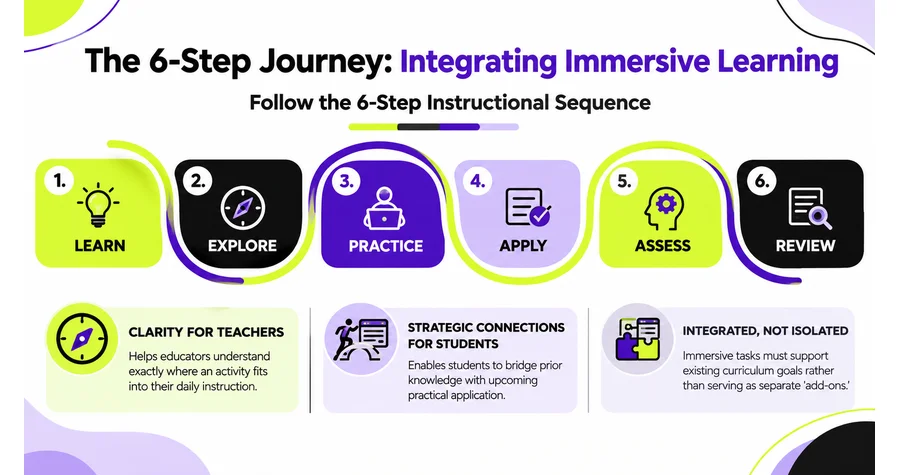
This helps teachers understand where the activity fits into instruction and when to use it. Students can connect the experience with what they have already learned and what they will practice next.
Review students’ choices and explanations alongside assessment results to understand what they have learned. Completion and time spent help teams review participation, but should not be treated as evidence of understanding on their own.
Reviewing Immersive Learning Outcomes and ROI in EdTech Products
Start with the learning objective and decide what the experience should help students understand or do. Review the information available through existing assessments and teacher feedback. Then decide what the immersive activity needs to capture.
For example, a virtual lab could record the choices students make, their explanations, and how their responses change across attempts. Teachers can review this alongside assessment results to understand where students still need support.
Track completion, time spent, and teacher use to understand participation and adoption. Keep these findings separate from the review of learning progress.
To support the ROI discussion, look at what the experience requires to build, deliver, and maintain. Include instructional design, accessibility, testing, integrations, device support, and future updates. Review whether existing assets or interaction models can be reused in other activities, and what changes they would need.
These findings give product leaders information to use in their investment assessment. They can review the learning results alongside delivery requirements and opportunities for reuse when deciding whether to improve or expand the experience. Learning gains should be reported separately from any financial return.
Choosing Immersive Learning Technology for EdTech Products
Immersive learning experiences can use interactive 3D content, augmented reality, or virtual reality. The choice depends on what students need to do and which devices the schools can support.
Interactive 3D content: Students can inspect models and interact with objects on a screen. An activity could ask them to rotate an object and examine its parts before answering a question.
Augmented reality (AR): AR adds digital content to a view of the learner’s surroundings. For example, a compatible tablet could display a model that students explore within their classroom.
Virtual reality (VR): VR can place students inside a digital environment through a headset. Consider whether being within that environment supports the learning task and how the school would manage its use.
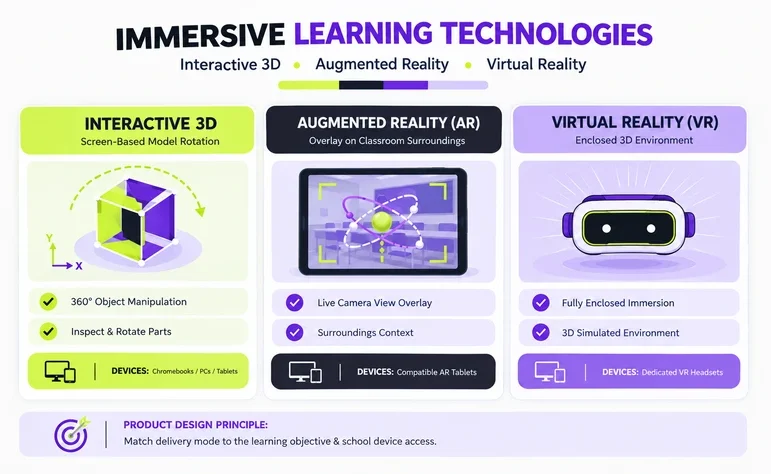
Virtual labs and simulations do not all require a headset. Choose the delivery approach around the activity and the devices the intended learners can access.
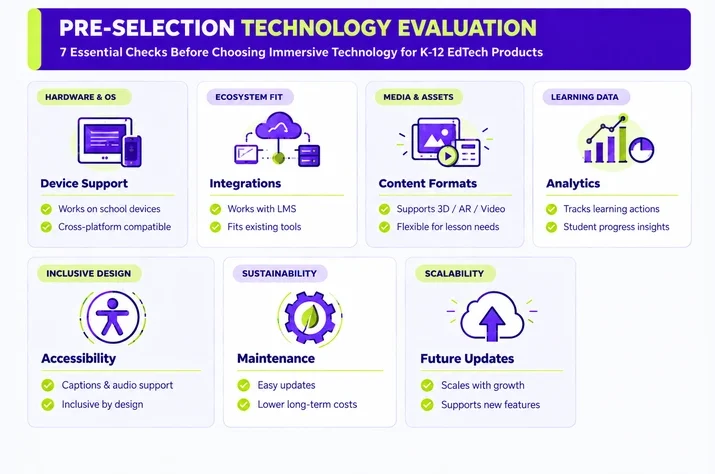
Before choosing the technology, check:
- Device support
- Integrations
- Content formats
- Analytics
- Accessibility
- Maintenance
- Ability to support future product updates
These checks help teams choose an approach that can scale with the learning product.
Designing Immersive Learning Experiences for Different Learners
Design the experience around the learners who will actually use it. Consider their familiarity with the subject and their experience with the technology. Provide clear instructions and let students practice the controls before beginning the main activity.
A student using a virtual lab for the first time may need prompts at each stage. Another student may be ready to complete the task with less guidance. Allow students to revisit instructions and feedback when they need help.
EdTech product teams should also review whether the language and level of challenge are suitable for the intended learners. Explain unfamiliar terms where they are needed within the activity.
Device access is important; avoid assuming all learners have the latest hardware. Ensure compatibility with common browsers, tablets, desktops, or other devices to achieve the same learning objectives.
Designing for different learners does not mean changing the learning goal for each student. It means removing unnecessary barriers between the learner and that goal.
Immersive Learning Use Cases for K-12 EdTech Products
Use immersive learning to give students access to learning experiences that traditional classroom methods cannot provide as easily.
In K-12, this can include:
- Science: Use a virtual lab to let students change a variable in an experiment, compare the results, and explain what happened.
- Mathematics: Use a 3D activity to let students rotate a solid shape and examine its faces from different views.
- Decision-making: Use a lab-safety scenario to let students identify a problem, choose a response, and review the outcome.
- Virtual exploration: Use a geography activity to let students inspect a landscape and identify features discussed in the lesson.
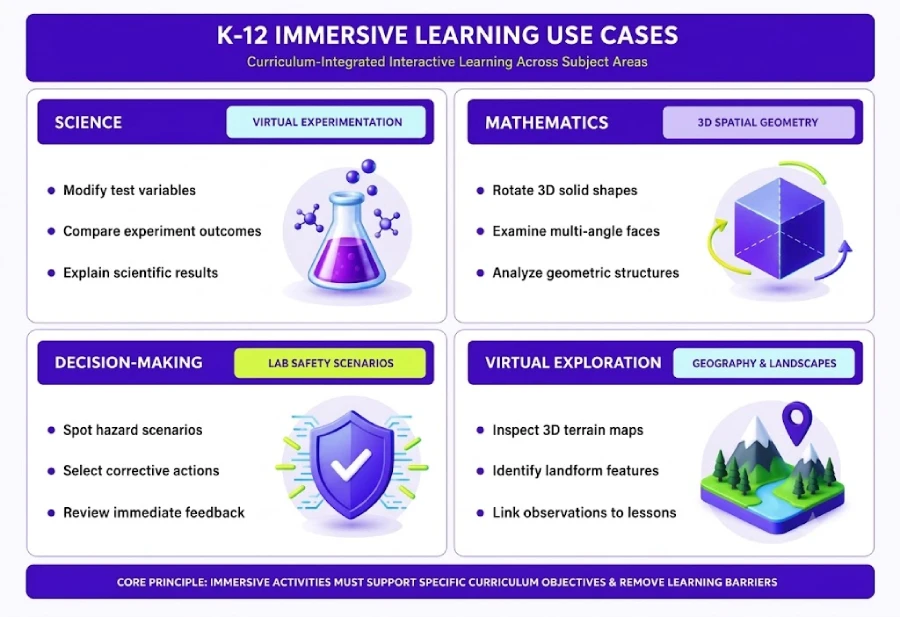
The best use cases integrate these experiences into the existing learning product. The immersive learning should support instruction, practice, assessment, and review rather than serve as a separate feature.
Using Simulations and Virtual Labs for Hands-On Learning
Give learners control over the experience. In a virtual lab, students can modify variables, see the outcomes, make errors, and retry without the limitations of a physical classroom. Through simulations, they can enhance decision-making skills in realistic scenarios and learn from the outcomes.
This creates a practical learning cycle as described in the infographic below:
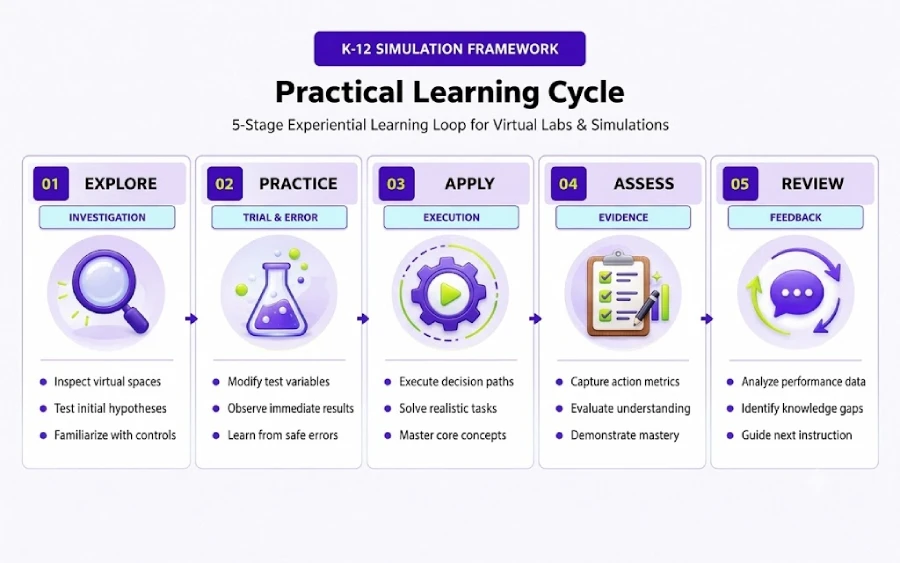
The product can also record student actions and outcomes. Teachers can then link that information to assessments and use it to understand how students perform during the activity.
The value of the simulation comes from the actions students take and the learning those actions generate.
Include physical practice when the learning objective requires students to handle equipment or materials. A virtual lab can support their understanding of the task, but students may still need to perform it with real equipment.
Building Accessible AR, VR, and Immersive Learning Experiences
Build accessibility into the product from the start. Review the activities with accessibility specialists while the design is still being developed. Depending on the experience, this may include:
- Captions for spoken content and important sounds.
- Descriptions of visual information students need to complete the task.
- Readable text, clear labels, and controls that are easy to locate.
- Alternatives to interactions that depend on a particular gesture or movement.
- Options to pause the experience or reduce unnecessary motion.
When a headset or control creates a barrier, provide another accessible way to complete the learning activity. Check that the alternative allows students to practice the intended skill or make the relevant decisions.
Combine accessibility checks with feedback from learners with disabilities. Test on the devices and assistive technologies the product is intended to support. Check whether students can follow the instructions, complete the activity, and access feedback.
Aligning Immersive Learning with Educational Standards and Learning Objectives
Start with the standard or competency the experience needs to support. Then define:
- The learning objective: What should students accomplish?
- The learning activity: What should students do inside the immersive experience?
- The evidence of learning: What should the product capture to show that students understand the concept or skill?
- The assessment connection: How does the experience connect to existing assessment?
- The teacher connection: How does the teacher use the experience and its results?
Build these connections before development rather than trying to add them later. Work with the curriculum team to confirm what the lesson requires and what students should be able to do after the activity.
For example, a lesson may ask students to explain how changing one variable in an experiment affects the result. The virtual lab should let them make that change, observe what happens, and explain their answer. Teachers can review the response alongside the lesson’s assessment.
The curriculum team should check that the activity supports the intended standard and is appropriate for the grade level.
This approach keeps immersive learning connected to the curriculum rather than turning it into an activity that sits outside the learning journey.
Validating Immersive Learning Before Scaling
Test the experience before expanding it across the product. Run a pilot in real learning environments and evaluate:
- Learner results
- Teacher feedback
- Curriculum alignment
- Accessibility
- Ease of use in schools
- Resources required to deliver the experience
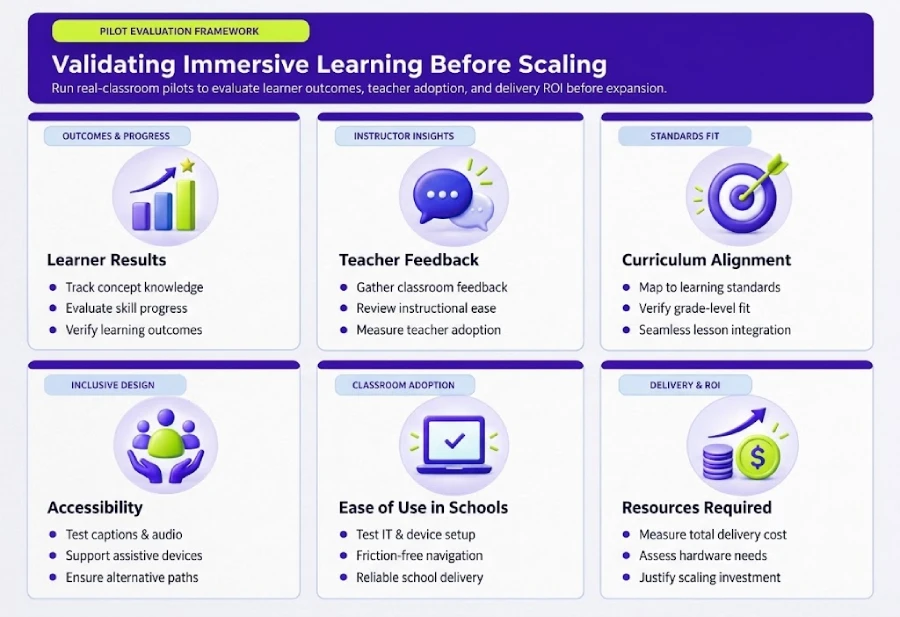
Use it to determine whether the learning value justifies the resources required to deliver the experience. Then use the findings to decide whether to improve the experience, expand it, or halt investment.
When planning future activities, review which parts of the existing experience can be reused and what needs to change. Reused content and features still need to be checked against the new learning objective and tested in the new activity.
Magic EdTech’s Approach to Immersive Learning Solutions
Magic EdTech brings together immersive learning solutions with learning design, content, accessibility, quality engineering, and educational expertise.
For K-12 publishers and edtech companies, this means working through the learning and development requirements together. We can help teams connect immersive activities with existing content and assessments, plan for accessibility, and test how the experience works within the wider product.
Our work supports the move from an initial concept or prototype to a learning experience that fits the product and the learners it serves. For example, see our virtual labs case study.
The Real Product Decision
The question is not whether a product can incorporate VR, AR, simulations, or virtual labs.
The question is whether immersive technology solves a real learning problem and delivers enough value to justify the investment.
Start with the learner’s challenge. Choose the technology that supports the learning goal. Integrate the experience into the broader learning journey. Align it with the curriculum and assessment. Design for accessibility and real classroom conditions. Measure learning outcomes and total cost. Then validate the product before scaling.
That process helps product leaders determine where immersive learning adds meaningful value and where it simply adds another layer of technology.

Nishant is a seasoned creative leader with 23+ years across animation, gaming, digital media, experiential, and learning production. He combines artistic vision with business discipline, driving scalable operations through AI-enabled pipelines, quality governance, and team leadership. He's a trusted partner for clients and peers, known for turning creative ideas into reliable, high-impact results.
FAQs
An immersive learning solution will contribute to better outcomes in a situation where the learning solution is able to assist in experimenting, discovering, applying, and learning difficult concepts in a classroom setting. Teams can integrate immersive learning experiences into the broader learning process.
It is not only about measuring learners' engagement time, but also about analyzing learners' knowledge of concepts, skill training, application, test scores, improvements due to training, adaptation by teachers, reusability in different courses, and delivery cost. Compare the figures and the development cost, accessibility, testing, integration, devices, and maintenance.
Virtual labs can be employed by conducting group experiments, simulations in decision-making, three-dimensional graphics for complicated concepts, virtual environments for hard-to-create scenarios, and AR/VR for scenarios where immersion will serve as an advantage in learning. The answer lies in what the goal of learning the team wants to accomplish and other considerations.
Create designs with various levels of experience, accessibility, and capability. Include navigation, guidance, captions, sound, accessible content, proper movement, alternative ways to complete tasks, and device support. This lets learners accomplish the same goal using different practical means.
Validate the experience in real learning environments before scaling. Use pilots to evaluate learner results, teacher feedback, curriculum alignment, accessibility, usability, and delivery resources. Reuse interaction models, analytics, and accessibility components to support future experiences and reduce unnecessary technical debt.

Get In Touch
Reach out to our team with your question and our representatives will get back to you within 24 working hours.